
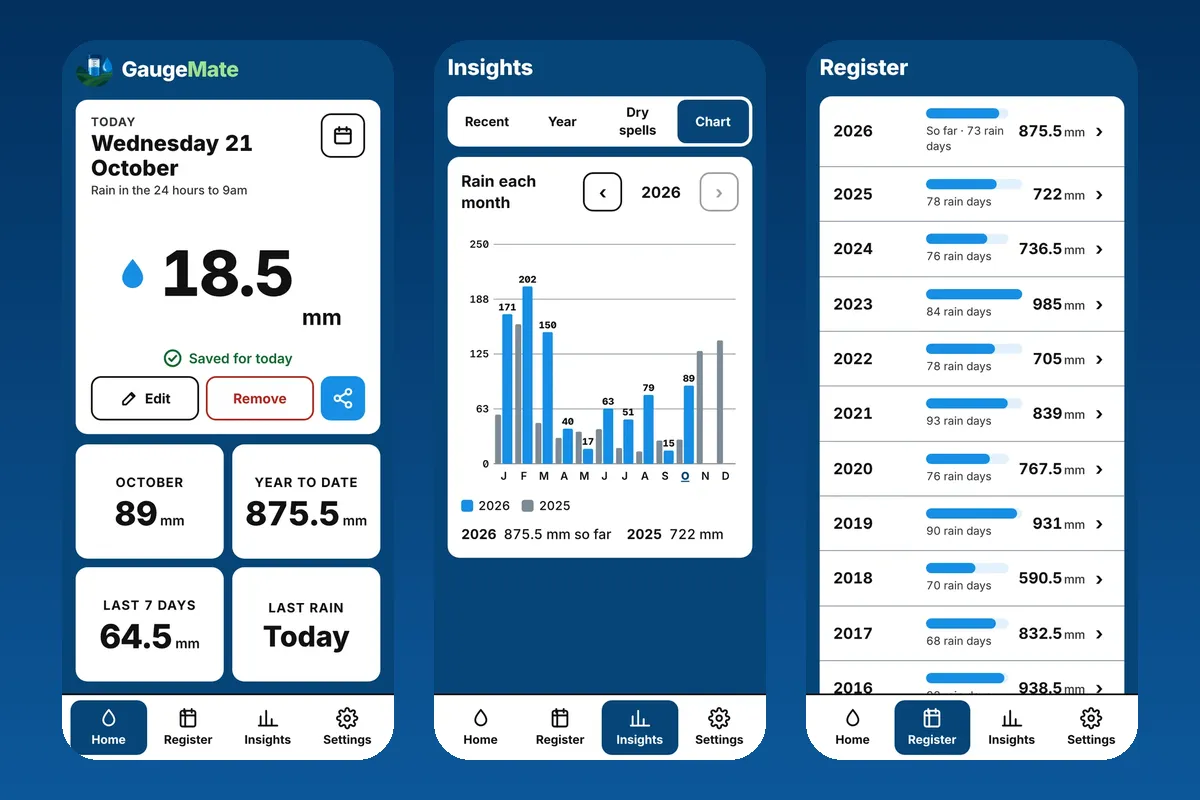
A good rainfall app makes your 9am reading quicker than writing it in a book, and keeps every reading safe for years. Look for one that works with no phone signal, speaks millimetres and points, keeps your records off the phone itself, and lets you get your figures out when the bank or a drought program asks.
There are plenty of weather apps, but only a handful are built for recording what's in your own gauge. Below is what matters, a checklist to compare them, and a fair look at the rainfall apps Australians actually use.
Why Use A Rainfall App Instead Of A Paper Rain Book
Paper rain books have served farms for generations, and plenty still hang by the back door. They don't need charging, and nobody has to learn anything. But they have weak spots:
- One copy. A flood, a fire, a spilt cuppa or a curious dog, and decades of records are gone.
- No sums. Monthly totals, year to date and "how does this year compare?" all mean a calculator and a spare half hour.
- Hard to share. If a partner, manager or neighbour reads the gauge while you're away, their figures end up on scraps of paper.
- Hard to hand over. Banks, insurers and drought programs want records they can read, not a photo of a smudged page.
A rainfall app fixes those while keeping the habit the same: read the gauge, write the number down. If you're new to the gauge itself, our guide on how to read a rain gauge covers getting an accurate reading.
Must-Have Features In A Rainfall App
Not every feature matters to everyone, but these are the ones worth checking before you put years of records into an app.
| Feature | What to check |
|---|---|
| Quick daily entry | Can I enter today's reading in a couple of taps? |
| Works with no signal | Does it save offline and catch up later? |
| Records kept off the phone | If I lose my phone, do my records come back? |
| Millimetres, points and inches | Can I switch units and keep old records? |
| Totals and charts | Does it show month, year to date and averages? |
| Old records | Can I type in or import past years? |
| Sharing | Can family or staff add rain to the same gauge? |
| Getting your data out | Can I download a PDF report or a spreadsheet? |
| Several gauges and properties | Can I keep separate gauges and see each one? |
| Cost and ads | Is it free, a subscription, or ad-supported? |
The two that people only think about once it's too late are where the records live and getting your data out. If an app keeps everything only on the phone, a lost phone means lost records. If it can't export, you're stuck with it forever.
Free Rainfall Apps: What To Watch Out For
"Free" can mean different things, so read the store listing closely:
- Free trial, then a subscription. Some apps are free to download but lock key features after a trial.
- Free with ads. Fine for some, annoying at 9am in the cold.
- Free, but you do the backups. Some tools leave saving copies of your records to you.
- "Virtual" rain gauges. Some weather apps estimate your rain from radar. Handy for a guess, but it isn't your gauge, and it won't match your records.
- Where your data goes. Check the privacy policy for whether your information is sold or shared.
Here's how the main options compared when we checked their store listings and websites in November 2026. Prices and features change, so check each listing before you decide.
| App | Cost (Nov 2026) | Works on |
|---|---|---|
| GaugeMate | Free, no ads | iPhone and Android (added from the website) |
| My Rainfall | App free; the content needs a news subscription | iPhone and Android |
| Rain Tracker | Free | iPhone |
| RainLog | Free trial, then a yearly subscription | iPhone and iPad (check Google Play for Android) |
| iPaddockRain | See App Store | iPhone and iPad |
| Rainfall Record | Free, no ads | Any web browser |
GaugeMate (home page)
- Pros: free with no ads; works with no signal; millimetres, points or inches; records stored safely and backed up nightly, so a lost phone loses nothing; several properties and gauges; share chosen gauges with Mates; PDF reports and Excel downloads; import old records.
- Cons: it's new, and it's added to your phone from the website rather than downloaded from the App Store or Google Play, which is unfamiliar to some people (it takes about a minute).
My Rainfall, inside the Queensland Country Life, The Land and other ACM rural news apps (App Store, Google Play)
- Pros: several gauges, charts, Excel download, and your rain compared with the district average going back 100 years; comes with the rural news.
- Cons: you need an ACM agriculture subscription to use it (the Australian App Store listed $11.99 a month or $124.99 a year when we checked); it's one part of a news app rather than a dedicated rain app.
Rain Tracker (App Store)
- Pros: free; quick entry from a calendar; several gauges; daily, monthly and yearly charts; CSV export; no account needed.
- Cons: iPhone only; the listing mentions millimetres and inches but not points; some reviews mention ads and confusing charts.
RainLog (App Store)
- Pros: syncs across your Apple devices; shared gauges; month and year-to-date comparisons with past years; CSV export; notes on entries; a community rain map.
- Cons: only a limited free trial, then a yearly subscription unlocks all features.
iPaddockRain (App Store)
- Pros: rainfall deciles; syncs between your iPhones and iPads; links with iPaddockYield if you're forecasting crop yields.
- Cons: Apple devices only; it's designed to work alongside the paid iPaddock farm apps.
Rainfall Record (website)
- Pros: free and no ads; spreadsheet-style records with live charts, totals and averages; nothing to install.
- Cons: a website rather than a phone app; it says you're responsible for your own backups.
Rainfall Apps For Farmers And Families
On a farm, rain isn't one person's job. The gauge at the house, the one at the back paddock and the one at the other block might be read by different people on different days. A rainfall app should let each gauge be shared with the right people, and let you see who entered each reading.
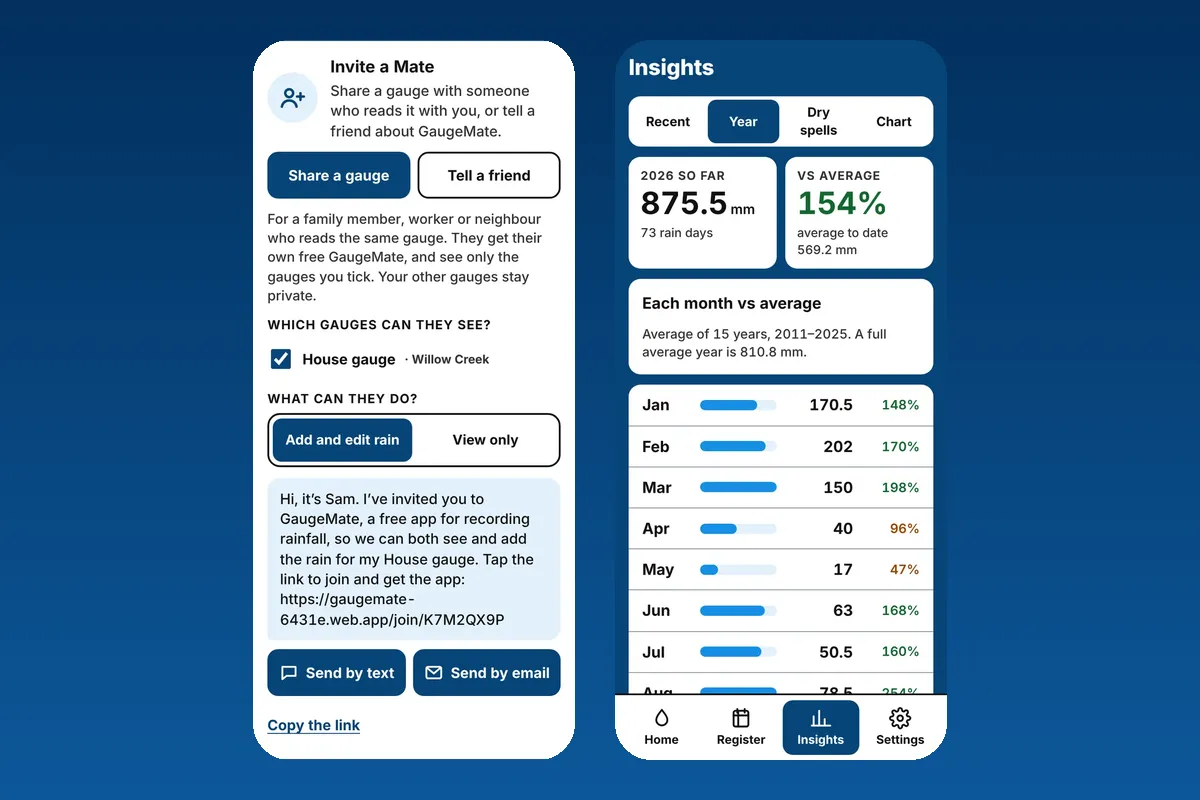
In GaugeMate, you invite a Mate by text or email to the gauges you choose, and decide whether they can add rain or only view it. Your other gauges stay private. Families use it the same way: Mum reads the gauge in town, the kids check the farm totals from the city.
Long-time records are where an app really pays off. Typing in a few years from the old rain book, or converting a box of readings in points with our rain converter, puts this year in context straight away. Our guide to points of rain to mm explains the old units.
The Short Version
Pick a rainfall app that's quick to use at 9am, works without signal, keeps your records safe off the phone, handles points as well as millimetres, and lets you download your records whenever you need them. If that sounds like what you're after, the free GaugeMate rain gauge app was built for exactly that.